Hacker News Trend
Hacker News Trend shows how often a word comes up on Hacker News over time. Type a keyword and you get a chart, the discussions driving it, and the stories and comments behind the numbers. Or compare up to four topics across all of Hacker News since 2007.
I built it in two days, in Rails 8 with Hotwire. It has no database. Everything on the page comes from one public API, so the whole project is really about using that API well: asking it the right questions, as few times as possible, and never showing a number it didn’t give.
Compare topics
The home page charts OpenAI, Anthropic and Rust by default. You can swap in any term and switch between all time, 10, 5, 2 or 1 years. Under the chart, one line reports the latest change of leader between complete periods, and each term’s peak.
OpenAI overtook Rust in 2023.
The current period is still filling up, so it’s drawn dashed and left out of the lead-change check. Otherwise a half-finished month would always look like a crash.
The API
All the data comes from the HN Search API, run by Algolia. It’s free, needs no key, and indexes every story and comment since 2007. It has two search endpoints that take the same parameters and differ only in ordering.
| Endpoint | Order | Used for |
|---|---|---|
/search | relevance, then points | The results table on Relevance, the trending view, the front page |
/search_by_date | newest first | The results table on Newest, and every count over time |
Every request is built from the same handful of parameters:
| Parameter | What it does here |
|---|---|
query | The keyword. Empty for the trending view, which wants top stories of any kind |
tags | story, comment or front_page, so stories and comments are never counted together |
numericFilters | A time range on created_at_i, plus points>=20 for trending |
hitsPerPage | 0 for counts, 20 for a page of results, 50 for the sample, 500 for trending |
typoTolerance | Always false, so a match means the word is really there |
attributesToRetrieve | Only title, url, author, points, comments and time, to keep responses small |
The response includes nbHits, the total number of matches, whatever page size you ask for. So a count costs one request with no rows at all, instead of downloading results and counting them. The whole chart is built on that.
Counting honestly
def trend_count(term, bucket) settled = bucket.ends_at < @now - 2.days body = @client.search( endpoint: :newest, query: term, tags: "story", numericFilters: Timeline.numeric_filter(bucket.starts_at, bucket.ends_at), typoTolerance: false, hitsPerPage: 0, # no rows, just the total expires_in: settled ? SETTLED_CACHE : nil ) body["nbHits"].to_iendEach range is half-open, created_at_i>=start,created_at_i<end, and aligned to UTC midnight. Buckets never overlap or leave gaps, so they add up exactly to the headline total, and the cache keys stay the same all day.
By default the search is typo tolerant, so “rust” also matches “just” and “trust”. That’s helpful in a search box and wrong in a chart, so it’s off everywhere.
- The chart counts stories only. Story counts are exact; comment counts are approximate at high volume.
- Figures that come from a sample, like “most discussed”, only see the 50 latest matches. They carry a “50 latest” tag so nobody reads them as all of Hacker News.
- Each window uses the finest grid that keeps it to about 20 points per term, since every point is a request.
| Window | One point per | Requests per term |
|---|---|---|
| All time | year, since 2007 | 20 |
| 10 years | half-year | 20 |
| 5 years | quarter | 20 |
| 2 years | month | 24 |
| 1 year | month | 12 |
A request budget per page
The browser never calls the API. The Rails server makes every request, so caching, timeouts and limits live in one place. Each view has a fixed budget:
| View | Requests | Made of |
|---|---|---|
| Keyword search, 7 or 30 days | ≤ 9 | 6–7 counts, 1 page of results, 1 sample of 50 |
| Trending, no keyword | 2 | Top 500 stories by points in the range, and the live front page |
| Compare topics | ≤ 96 | One count per term per period, 4 terms at most |
The requests for one page run in parallel on a shared pool of eight threads. A busy minute queues work on the pool instead of opening hundreds of connections to someone else’s free API.
def self.pool = @pool ||= Concurrent::FixedThreadPool.new(MAX_CONCURRENCY) # 8 def run_concurrently(jobs) futures = jobs.map do |job| Concurrent::Promises.future_on(self.class.pool) do Rails.application.executor.wrap { job.call } end end futures.map(&:value!) # re-raises the job's own errorendA careful client
The HTTP client is about 70 lines, and most of them are about what happens when things go wrong.
def search(endpoint:, expires_in: nil, **params) path = ENDPOINTS.fetch(endpoint) # sorted params: the same question always gets the same cache key query = URI.encode_www_form(params.compact.sort_by { |key, _| key.to_s }) @cache.fetch("hn-algolia/v1/#{path}?#{query}", expires_in: expires_in || @expires_in) do request(path, query) endend| Case | What happens |
|---|---|
| Fresh results | Cached for 10 minutes |
| A period that ended 2+ days ago | Cached for a week; it can't change |
| Over 4 s to connect or 6 s to read | An error state with a retry button |
| The connection never opened | Retried once. A slow response is never retried, so a struggling API isn't hit twice |
| Non-2xx, malformed JSON, no hits array | An error, never cached, never replaced with made-up data |
| Highlight payloads in the response | Dropped before caching; they're large and unused |
Finding trending keywords
Before you type anything, the page shows what’s trending. That costs one request: the top 500 stories by points in the last week or month, with at least 20 points each. The keywords are worked out from their titles in Ruby.
One /search request: empty query, tags=story, a time range and points>=20, 500 hits, six fields each.
stories: 500
requests: 1
Then they become a physics pile you can drag, throw, or click to search.
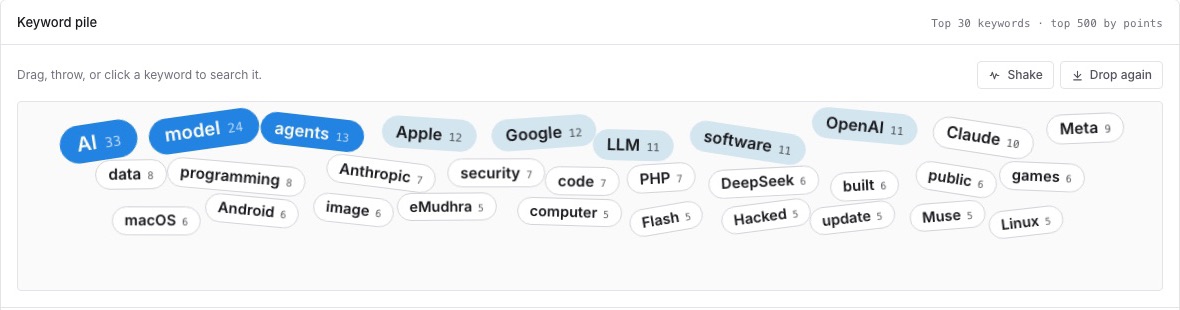
- Matter.js, about 27 KB, loads only when the pile scrolls into view.
- Without JavaScript, or with reduced motion, it stays a plain list of links.
- A pill tipped past 90° is drawn the other way round, so labels are never upside down.
Rails in a container
It runs on Cloudflare Containers. A tiny Worker receives every request and forwards it to one of two containers running the Rails app, which sleep after 30 idle minutes.
- BrowserTurbo + Stimulus
- Workerpicks a container
- Rails 8Puma, in-memory cache
- HN Search API≤ 9 calls / search
The cache lives in each container’s memory, so more containers would mean more cold caches and more calls to the API. Two keeps one spare while the other restarts.
const INSTANCES = 2; // Rails.cache is in memory: fewer instances, more cache hits export class HnSearchApp extends Container { defaultPort = 8080; sleepAfter = "30m";} export default { async fetch(request, env) { const app = await getRandom(env.HN_APP, INSTANCES); return app.fetch(request); },};Every option, from the keyword to the sort and the time range, lives in the URL, so any view can be shared and crawled. There’s a sitemap, an llms.txt and plain-text pages for AI tools explaining where the numbers come from.
Built with Rails 8, Cloudflare Containers, HN Search API.